
The chats that never left
QuorX slowed down after five or more heavy chats. Measuring first showed most guesses were wrong. Sleeping tabs saved the most, and the last cause was a leak that kept every chat ever opened alive. How it was found and fixed in 0.2.18.
People using QuorX for image generation and 3D work kept saying the same thing: after five or six chats, the app felt slow. Switching chats took longer, scrolling stuttered, and the computer's memory filled up. This is how that slowdown was measured, what turned out to cause it, and how 0.2.18 fixed it.
Guessing first, then measuring
Reading the code gave a list of likely causes: hidden chats kept fully loaded, 3D previews that kept drawing, screenshots stored as text, PDFs open in every chat, pictures that never unloaded, and timers running in the background. Each one sounded plausible. None of them had been measured.
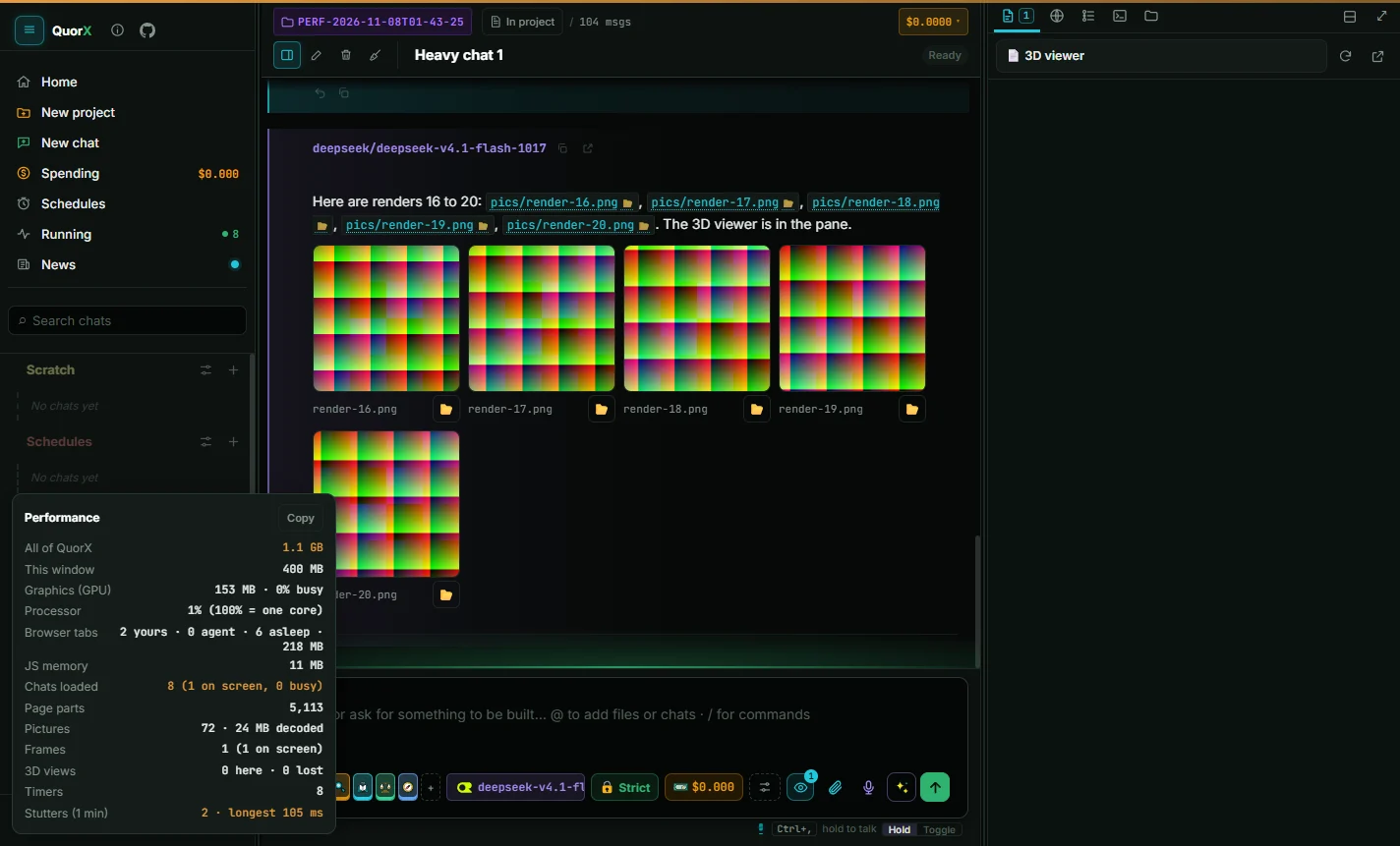
So the first step changed nothing. QuorX got a performance readout (it's in ⚙ Settings → Appearance → Under the hood) and a test that drives the real app the way a heavy user would: 8 chats in one project, each with about 20 pictures, 25 screenshots and a 3D viewer, opened one after another, switched between, and scrolled. The test runs through QuorX's own window, takes a screenshot at every step and reads the readout each time. Three runs agreed within a few percent.
What the baseline showed
8 heavy chats came to 2.1 GB. Most of the guesses were wrong:
| Guess | What the numbers said |
|---|---|
| Hidden browser tabs stay awake | Confirmed, the biggest cost. About 127 MB each: 1.0 GB of the 2.1 GB at 8 chats |
| Hidden chats stay loaded | Smaller than expected. The window grew only about 30 MB over 8 chats |
| 3D previews keep drawing | Dropped. A hidden preview draws 0 frames, and leaving it removes it |
| Screenshots stored as text | Dropped. They were already saved as files |
| PDFs open in every chat | Small. PDFs stay folded until you click them |
| Pictures never unload | Small. About 24 MB of decoded pictures on screen |
| Background timers | No idle problem seen, but worth pausing when hidden |
The plan had started with hidden chats. The numbers put browser tabs first.
Fix 1: tabs that sleep
Every browser tab in QuorX, yours or the agent's, is a full browser page with its own process. Hidden ones stayed awake until the app reloaded. Now a tab you can't see goes to sleep after 5 minutes, or sooner once more than two hidden tabs are awake. QuorX keeps its address, scroll position and a still picture. Coming back shows the picture at once and wakes the page where it was, in about a second. Tabs playing sound, with a half-filled form, in use by the agent, or with DevTools open stay awake.
| 8 heavy chats, a minute after the last | Before | After |
|---|---|---|
| Browser tabs | 1.0 GB, 8 awake | 258 MB, 2 awake and 6 asleep |
| All of QuorX | 1.96 GB | 1.19 GB |
A big step, but still above the 1 GB goal.
Fix 2: the freeze that wasn't about memory
The next guess was that hidden chats needed "freezing". Measuring showed they already left the page when you switched away, so there was nothing to freeze. The real cost was elsewhere: redrawing a long chat on every switch. A chat with 100 rounds (208 messages) froze the window for 1.8 seconds each time it opened.
QuorX now draws the newest 30 messages first and older ones in small slices as you scroll up, lets messages off screen skip layout, and stops measuring the message box up to 7 times per switch. Opening that chat now takes 130 to 340 ms.
Fix 3: the chats that never left
Long chats raised a new question. With 8 of them fully scrolled, the window still reached about 0.9 GB. The plan was to unload messages far from view. Before building that, the test learned one more trick: force a garbage collection, then count every element still alive and compare it with the elements actually on the page.
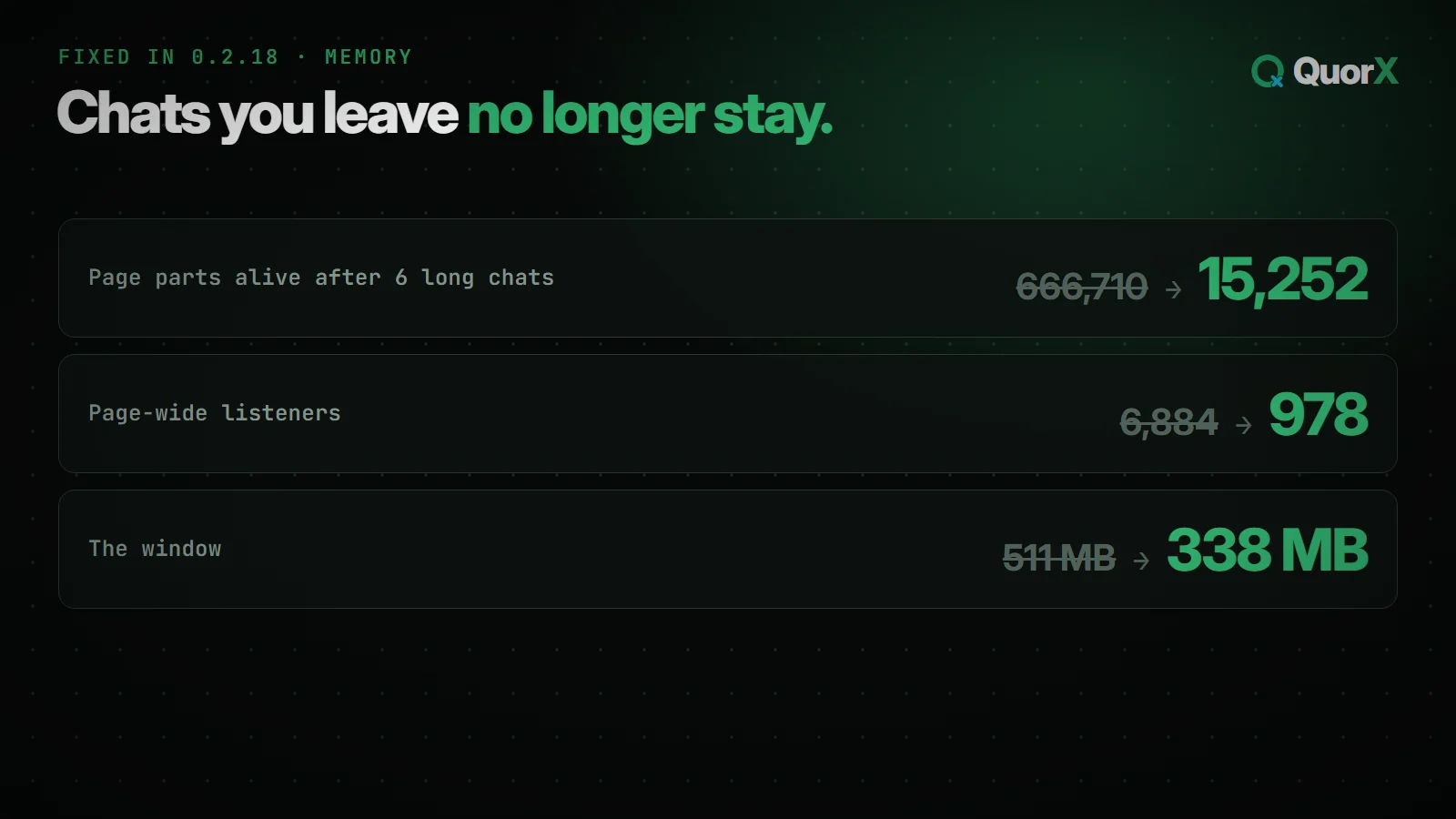
After 6 long chats, about 5,000 elements were on screen. 666,710 were alive.
Counting the page-wide listeners pointed to the cause: 6,884 of them. Every time a chat's message box was drawn, it added two listeners to the whole page, one for a click outside its quick settings and one for Escape, and never removed them. Each listener held the message box. Holding a single element of a chat that left the screen keeps that whole chat alive, so every chat ever opened stayed in memory, page and all, and the pile grew with each switch.
The fix ties those listeners to the chat: when it leaves the screen, they're removed with it. The same moment now also stops the message list's resize watcher, the message box's fit watcher, and the loader for pictures not yet scrolled to.
| After 6 long chats and a garbage collection | Before | After |
|---|---|---|
| Elements alive (about 5,000 on screen) | 666,710 | 15,252 |
| Page-wide listeners | 6,884 | 978 |
| Window memory | 511 MB | 338 MB |
With 8 long chats and another chat open, all of QuorX now sits at 1.07 GB. Unloading far-off messages turned out not to be needed: a fully scrolled 208-message chat costs only about 56 MB more than one with just its newest messages drawn.
Fix 4: idle means idle
The last piece was the processor. The tooltip check, both countdown clocks, the desktop tab placement and the readout now pause while the window is hidden. Minimised and idle, QuorX uses 0%, measured with the window really minimised.
The whole story in numbers
- 8 heavy chats: 2.1 GB
Browser tabs 1.0 GB. Switching chats 80 to 180 ms. One stutter of about 100 ms on each heavy chat opened.
measured - 1.96 GB → 1.19 GB
Hidden tabs sleep and wake where they were. 5 hidden tabs: 647 → 128 MB.
fixed - 1.8 s → 130–340 ms
The newest messages draw first; older ones load as you scroll up.
fixed - Nothing to fix
A hidden 3D preview draws 0 frames. 2048-pixel pictures cost about 30 MB more than 1024.
measured - 666,710 → 15,252 alive
Chats you leave are freed. 8 long chats: 1.07 GB for all of QuorX.
fixed - 0% minimised
Timers pause while the window is hidden.
fixed
What it taught
- Measure before fixing. The first plan would have spent its effort on hidden chats, which cost 30 MB. The browser tabs cost 1 GB.
- Count what's alive, not just what's on the page. Memory totals said "a bit high". The count of live elements against visible ones said "something is holding on to everything", and pointed straight at the cause.
- Keep the tools. The readout ships in the app, and the heavy-session test and the live-element count are part of QuorX's tests, so the next slowdown starts with numbers. If QuorX feels slow for you, turn on the readout, press Copy, and paste the numbers into an issue.
All of this is in 0.2.18. The full list is in What's new in 0.2.18, and the work is tracked in issue #268.